
Why I Decided to Build a Mobile IDE Instead of Another AI App
I used to work at a company focusing on low-level system development. The work was technically solid but often felt fragmented. Over time, I realized I was mostly working within narrow boundaries of large systems, which made it harder to stay connected to the bigger picture of what I was building.

When AI started to evolve rapidly, like many developers I found myself both excited and uncertain. Coding capability grew faster than expected, and it naturally raised questions about the future of software development roles.
But over time my perspective shifted. Instead of thinking about AI as a replacement force, I began to see it as a shift in how software is created and interacted with.
That shift pulled me toward a different question: What does a native AI application actually look like on a mobile device?
At first the market seemed full of AI apps. New products appeared constantly—chatbots, writing tools, coding assistants, automation tools. But the more I explored, the more I noticed a pattern. Most AI applications were still built around a very narrow interaction model: a prompt box, a response output, and some form of lightweight workflow wrapping.
Even when the underlying models were powerful, the product surface remained simple and repetitive. That led me to a realization:
The AI application layer on mobile is still in its early form—mostly conversational, not system-driven.
That distinction became important. AI is not just about generating responses. It is increasingly about orchestrating actions, systems and workflows. And that is where I started to rethink the role of a mobile IDE.
Rethinking what an AI application can be
Most AI apps today focus on interaction—asking questions and receiving answers. But software development, even at a simplified level, is not just conversation. It is a structured process: understanding context, generating or modifying logic, executing actions, observing results and iterating continuously.
In most AI tools these steps are disconnected, and the user is still responsible for bridging the gap between intention and execution. That creates a subtle limitation:
AI can generate output, but it does not own the workflow.
So I started to ask a different question: What if an AI application on mobile could own the entire loop, not just the response?
Not just answering prompts, but managing a continuous system of intent → generation → execution → feedback → iteration. That's where the idea of a mobile IDE began to form—not as a traditional "development tool", but as something closer to a workflow-native AI application.
From tools to AI-native workflows
The more I explored AI systems, the clearer it became that the real shift isn't about individual features like code generation or chat interfaces. It's structural:
AI is turning software from static tools into dynamic workflows.
In this context, the concept of an IDE changes meaning. It is no longer just an environment for editing code. It becomes a system that can understand user intent, generate structured outputs, execute actions in real environments, observe results and continue iterating. In other words, the IDE becomes a workflow engine powered by AI.
This is especially relevant on mobile, where interaction is naturally intent-driven rather than process-heavy. Users don't want to manage systems manually on a small screen. They want to express intent and see results. So the question shifts from "how do we shrink a development environment into mobile?" to "what does an AI-native workflow application look like on mobile?"
The shift in interaction model
Traditional software interaction is based on explicit control: open tools, configure environments, execute steps manually. AI changes the interaction model fundamentally. It introduces intent-driven execution, where the user provides goals, constraints and context, and the system handles decomposition, execution, orchestration and iteration.
This makes mobile devices especially interesting—not because they are limited versions of desktops, but because they naturally align with intent-driven interaction. Mobile is not a constraint here. It is a natural interface for AI-native workflows: short inputs, fast iterations, contextual usage and continuous interaction loops.
What a mobile IDE actually becomes
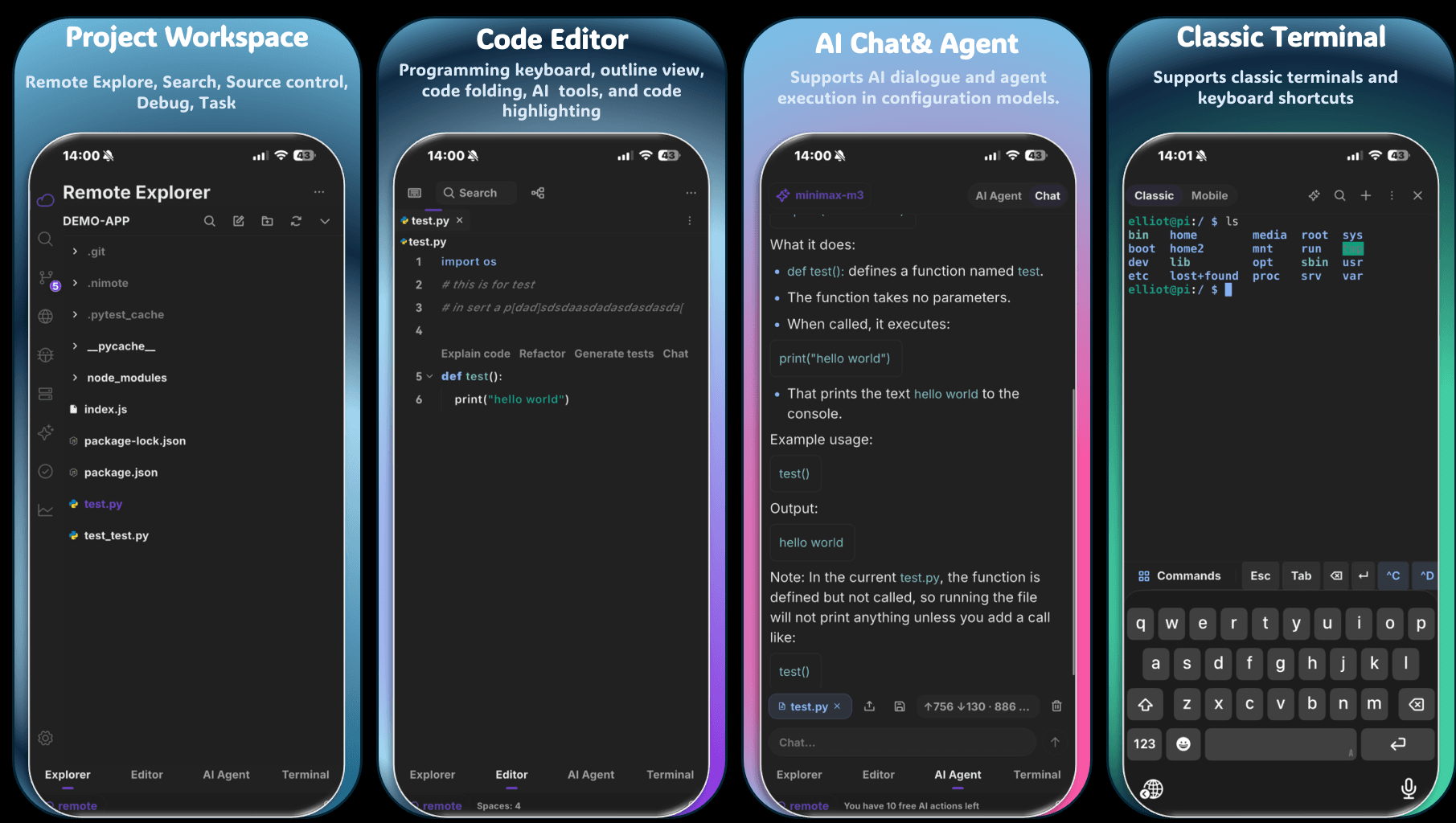
In this framing, a mobile IDE is not a tool for writing code. It becomes a system that connects three layers:
- Intent layer — users express what they want to achieve in natural language.
- AI orchestration layer — the system interprets intent, generates solutions and plans execution steps.
- Execution layer — remote environments, APIs, services and workflows are triggered and managed.
So the product is no longer defined by editing capability. It is defined by the ability to turn intent into executed systems. A mobile IDE in this sense is not a scaled-down development environment; it is an AI-native workflow application that happens to include development as one of its capabilities.
Why this matters now
AI is collapsing the gap between thinking, describing and executing. As that gap shrinks, the value of software shifts upward—from tools that require manual operation to systems that respond directly to intent. In that world, the most important product question becomes: how quickly can a user turn an idea into a working system?
Not how many features a tool has, or how complete an environment is, but how directly intent can become execution.
Conclusion
The decision to build a mobile IDE was not really about development tools. It was about recognizing a shift in what AI applications are becoming. The next generation will not be chat interfaces or standalone tools; they will be workflow-driven systems that translate intent into action. A mobile IDE is just one early form of that direction—an AI-native application where interaction, generation and execution are part of a single continuous loop.
NimoteCode is my attempt at that. See how the pieces fit in Mobile IDE, Mobile AI Coding and NimoteCode Features, and read the build story in I Built a Mobile IDE With ~90% AI-Generated Code.
Related content
- Mobile IDE overview — files, editor, terminal, Git and debugging in one workspace
- Mobile AI coding workspace — the AI-native development loop on a phone
- I Built a Mobile IDE With ~90% AI-Generated Code — the full build story
About the author · Building NimoteCode, a mobile-first IDE built with Flutter and Rust. Follow the project on DEV.to · GitHub · X.